Single Alert
The single alert API is the core capability of the terminal, used to trigger the device to perform a single custom audible and visual announcement.
Trigger the alarm light to perform a custom audible and visual announcement through a single alert.
Note: The audible and visual announcement triggered by this interface can only be executed once.
Interface Configuration
Section titled "Interface Configuration"Request Address: http://<Device IP Address>/api/api/send_msg
Request Method: POST
Data Type: form-data
Request Parameters
| Parameter Name | Variable Type | Description | Required |
|---|---|---|---|
| led_style | string | LED style parameter, see the table below for details. | |
| color | json | Key is the LED layer number, value is an array of LED colors, supporting RGB color codes and W3C standard color names Example: {“1”:[“blue”]} or {“2”:[“#00ffff”]} 1 means the first layer, 2 means the second layer. Only rotating bright supports multiple color arrays. | |
| led_flag | json | LED style parameter, see the table below for details. | |
| text | string | The text content to be announced, maximum 150 characters. The current version will not report an error if exceeded, but it will be truncated. | |
| tts_speed | int | Speech announcement speed, range 1~10. If not provided, the default is medium speed. | |
| play_time | int | Announcement duration. When this value is present, if the announcement is not completed within the specified time, the content will be truncated. | |
| repeat_count | int | Number of times to repeat the announcement, default is 1. | |
| tone | string | Ringtone number, this value can be obtained from the prompt tone in the notification group settings. | |
| time | string | Current Unix timestamp; used for signature verification in legacy firmware, not verified now, optional. | No |
| sign | string | Legacy signature string; not verified now, optional. | No |
| sound | string | 0: Specify female voice announcement (default is female voice); 1: Specify male voice announcement; |
LED Style Parameters
| Style Value | Effect | Parameter Index | Parameter Description | Recommended Value |
|---|---|---|---|---|
| 15 | Rotating Bright | 0 | Rotation interval time (seconds) | [0.03,1] |
| 1 | Acceleration factor | |||
| 20 | Flashing Bright | 0 | Flash duration (seconds) | [1, 1] |
| 1 | Light-off duration (seconds) | |||
| 25 | Steady Bright | No parameters, fill in [0] as a placeholder. | ||
| 30 | Pulsing | No parameters, fill in [0] as a placeholder. | ||
Debugging Example
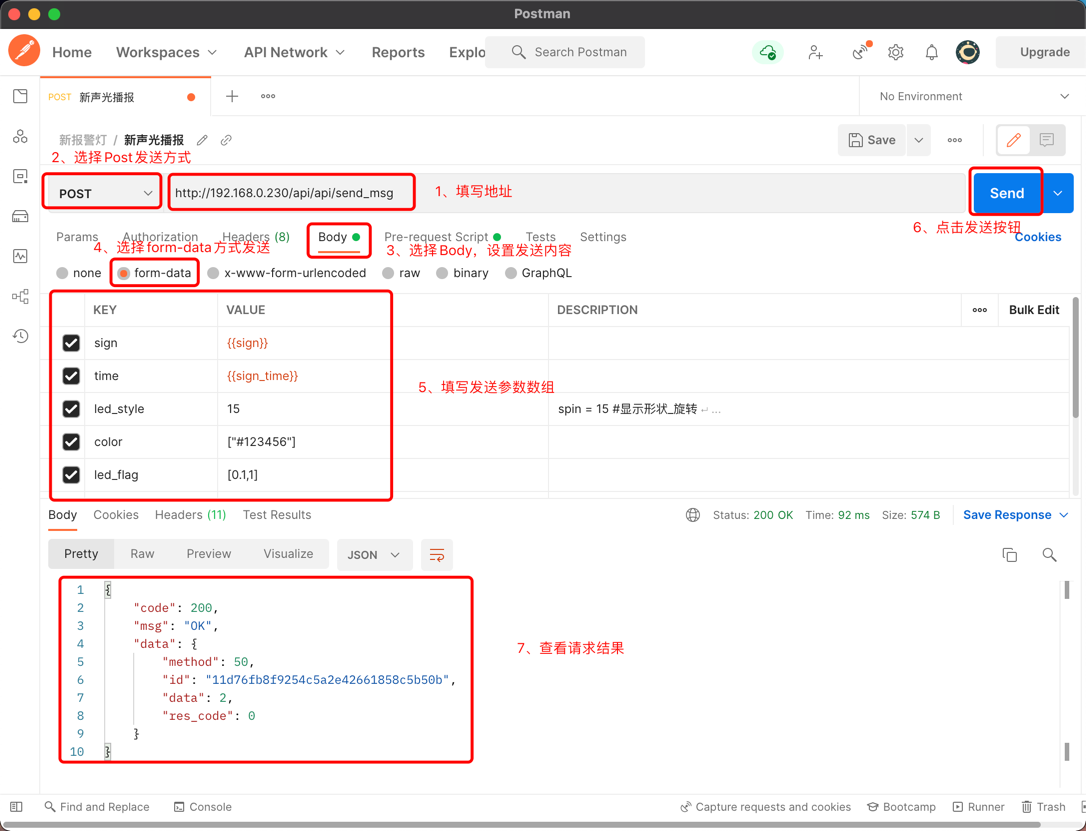
Section titled "Debugging Example"Please refer to the steps in the image below. You can click the image to enlarge it.
In addition to manually creating requests, a Postman test configuration file is provided in the download section. The legacy signature script may remain; the current firmware does not verify signatures.
Official Website - Resources - Boling Voice Notification Terminal HTTP Interface Debugging Demo (Postman)